AI chatbots are impressive, but they have one big flaw: they often “hallucinate” or give outdated answers. The solution? RAG (Retrieval-Augmented Generation).
By combining an AI model with a vector database (like Pinecone or FAISS), you can ground your chatbot in your own data. The result: smarter, more reliable workflows.
👉 If you’re just starting with AI workflows, see Notion, Zapier & ChatGPT: How to Create a Free AI Workflow.
First, What’s an AI Model?
Think of an AI model like:
- A recipe: ingredients (data), instructions (algorithms), and a finished dish (text, answers, or code).
- Or an engine: you don’t need to know every moving part, but you should know which engine is faster, stronger, or more efficient.
Different models (GPT, Claude, Gemini, LLaMA) are different “engines” — RAG gives them better fuel.
👉 Related: How to Understand AI Models Without the Jargon.
What Is RAG? (Library Analogy)
Imagine asking a librarian a question:
- A regular AI model is like a librarian answering from memory (fast but not always accurate).
- RAG is like the librarian checking the shelves first, then giving you a precise answer.
This is what tools like Perplexity AI or ChatGPT with custom data already do.
👉 For a beginner-friendly intro, read What Is RAG and Why It Matters.
Step 1: Collect Your Knowledge Base
Gather the data you want your chatbot to know:
- PDFs (manuals, research papers).
- FAQs.
- Notes or documentation.
Format it into plain text or chunks — easier for AI to process.
Step 2: Embed the Data
Before storage, your text must be turned into vectors (mathematical representations).
- Use an embedding model (e.g., OpenAI’s
text-embedding-ada-002). - Each document chunk becomes a vector in a high-dimensional space.
Analogy: Think of vectors like coordinates on a map of meaning. Words and phrases with similar meaning are “close together.”
Step 3: Store in a Vector Database
Now store these vectors in a database optimized for semantic search:
- Pinecone → Cloud-hosted, scalable, easy to integrate.
- FAISS (by Meta) → Free and local, great for small projects.
👉 For beginners exploring free tools, check Top 5 Free AI Tools You Can Start Using Today (No Tech Skills Needed).
Step 4: Connect to GPT or Claude/Gemini
When a user asks a question:
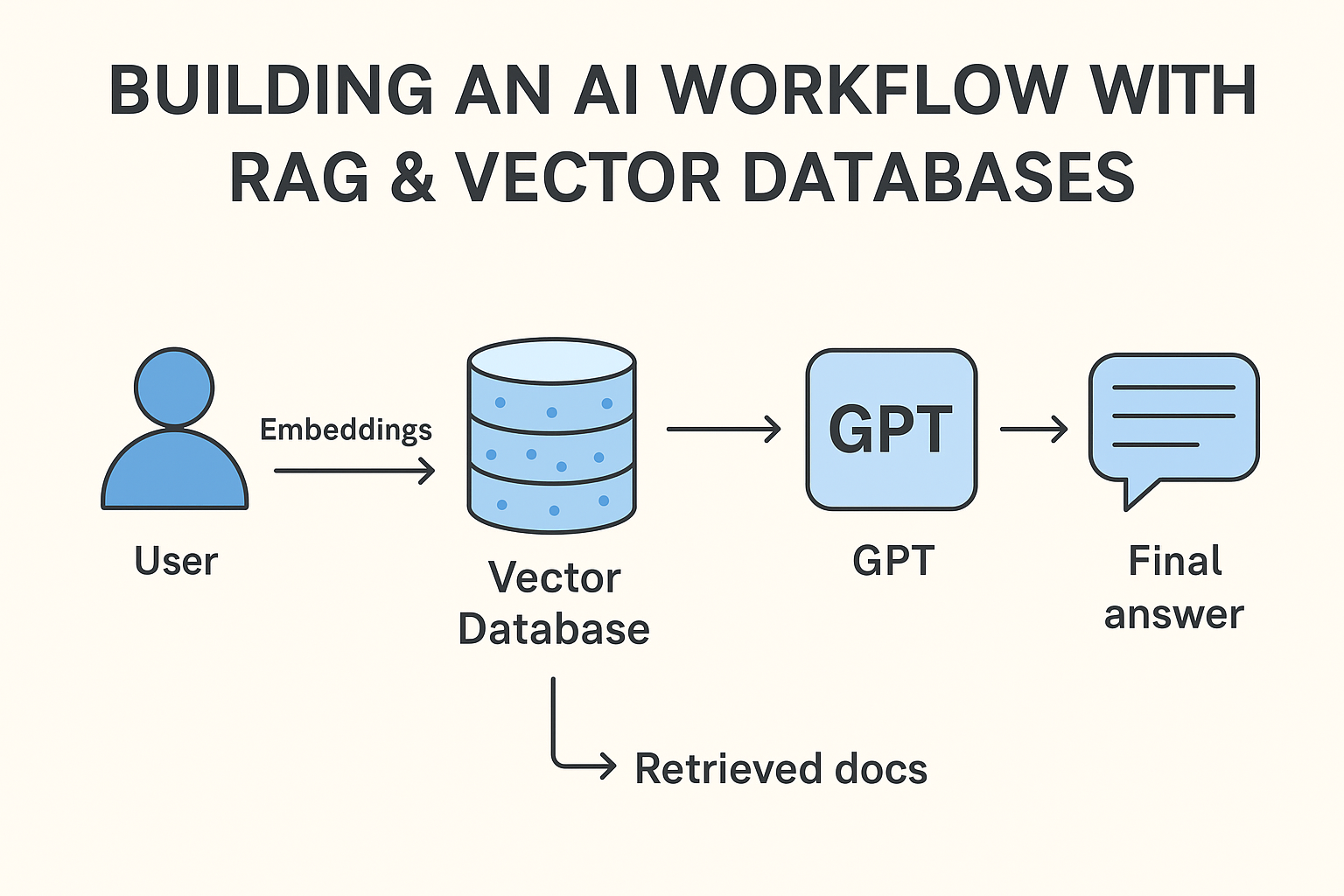
- Convert the query into a vector.
- Search the vector database for the closest matches.
- Send both the query + retrieved documents to GPT (or another LLM).
- GPT generates a grounded, context-aware answer.
Diagram (simplified):
User Question → Embeddings → Vector Database (Pinecone/FAISS) → Retrieved Docs → GPT → Final Answer
Step 5: Deploy as a Workflow
You can deploy this setup in several ways:
- Replit Agents → Great for experimenting with Claude + vector search.
- Flowise → Drag-and-drop interface for RAG workflows.
- LangChain → For advanced users chaining prompts and tools.
👉 See Prompt Chaining Made Easy: Learn with Real-World Examples.
Why RAG + Vector DBs Matter in 2025
- For Businesses: Ground customer chatbots in your documentation.
- For Students: Build AI tutors that read your textbooks.
- For Creators: Summarize, search, and cite your notes instantly.
👉 This shift is why Big Tech Is Betting Everything on the Next AI Model.
Conclusion
RAG with vector databases isn’t just a buzzword — it’s the foundation of the next wave of AI search and automation. By combining retrieval (finding the right info) with generation (crafting responses), you can build workflows that are smarter, faster, and reliable.
If you’ve used Perplexity AI or uploaded documents into ChatGPT, you’ve already used RAG. The next step is building your own workflow with tools like Pinecone, FAISS, and GPT.
👉 Next: How to Deploy AI Agents for Everyday Tasks (Free Tools).