For many beginners, the terminal looks intimidating. It’s a black screen filled with text, strange commands, and no buttons to click. Yet, for developers, the terminal is one of the most powerful and frequently used tools.
Understanding what a terminal is—and why developers rely on it—can remove a lot of fear and confusion early in your tech journey.
What Is a Terminal?
A terminal is a text-based interface that allows users to interact directly with a computer’s operating system.
Instead of clicking buttons or menus, you:
- Type commands
- Press Enter
- Get immediate results
The terminal gives you direct control over your system.
Terminal vs Graphical User Interface (GUI)
Most people are familiar with graphical interfaces like file explorers and settings panels. The terminal offers a different approach.
| GUI | Terminal |
|---|---|
| Click-based | Text-based |
| Visual menus | Typed commands |
| Beginner-friendly | Powerful and precise |
| Limited automation | Highly automatable |
The terminal isn’t better than a GUI—it’s more efficient for certain tasks.
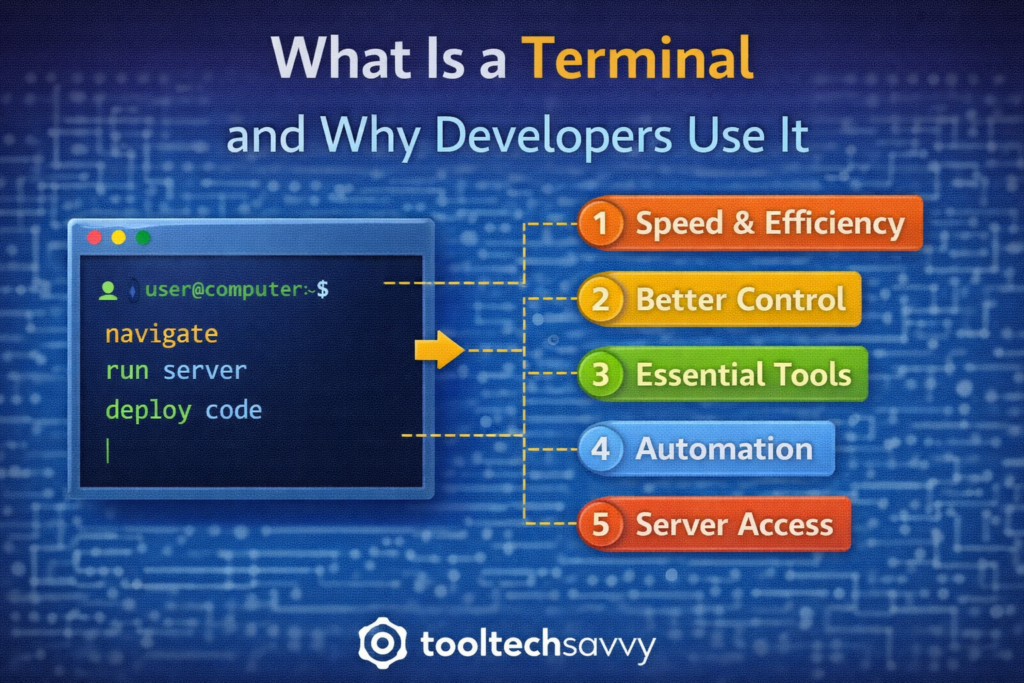
Why Developers Use the Terminal
1. Speed and Efficiency
Typing a single command can replace multiple clicks. Once learned, the terminal is often faster than navigating menus.
2. Better Control
The terminal provides access to system-level operations that are difficult or impossible to do through a GUI.
Developers use it to:
- Manage files
- Run programs
- Control servers
- Inspect system behavior
3. Essential for Development Tools
Many development tools are designed to work through the terminal, including:
- Version control systems
- Package managers
- Build tools
- Testing frameworks
If you code, you’ll eventually use the terminal—whether you want to or not.
4. Automation and Scripting
The terminal makes it easy to:
- Automate repetitive tasks
- Run scripts
- Chain commands together
This is a key reason terminals are heavily used in DevOps and cloud environments.
5. Remote System Access
When working with servers or cloud systems, the terminal is often the primary way to connect and manage them.
Developers and engineers use terminals to:
- Deploy applications
- Monitor systems
- Troubleshoot issues
What Can You Do with a Terminal?
Common beginner-friendly uses include:
- Navigating folders
- Creating and deleting files
- Running applications
- Installing software
- Managing code projects
As skills grow, terminals become essential for advanced workflows.
Why the Terminal Feels Scary at First
The terminal:
- Doesn’t guide you visually
- Requires precise commands
- Doesn’t forgive mistakes easily
This can feel uncomfortable—but it’s also why developers value it. Precision leads to power.
How Beginners Should Approach the Terminal
A stress-free approach:
- Start with basic navigation commands
- Learn one command at a time
- Practice in a safe environment
- Don’t try to memorize everything
You don’t need to master the terminal—you just need to get comfortable using it.
Terminal, DevOps, and Cloud Computing
The terminal plays a central role in:
- Cloud deployments
- CI/CD pipelines
- Container management
- Infrastructure automation
Once you understand the terminal, learning DevOps and cloud tools becomes far easier.
Common Terminal Myths
- You don’t need to be a “power user” to use it
- One wrong command won’t destroy your computer
- You don’t need to memorize hundreds of commands
- Everyone learns it gradually
Confidence comes with use, not expertise.
Final Thoughts
The terminal is not an outdated or niche tool—it’s a core part of modern software development. Developers use it because it’s fast, flexible, and powerful.
For beginners, learning the terminal is less about commands and more about mindset. Once the fear is gone, the terminal becomes one of the most useful tools in your workflow.
To continue learning—from developer tools to advanced topics like AI—visit https://tooltechsavvy.com/.
Explore the blog to discover AI, software engineering, cloud, DevOps, tools, and other interesting topics designed to help you grow confidently in tech.