If you’re new to cloud computing or DevOps, you’ve probably seen the terms virtual machine and container used almost interchangeably. While they solve similar problems, they work in very different ways.
Understanding the difference between virtual machines and containers is an important step toward understanding how modern software is built, deployed, and scaled. This guide explains both concepts simply—without buzzwords.
What Is a Virtual Machine?
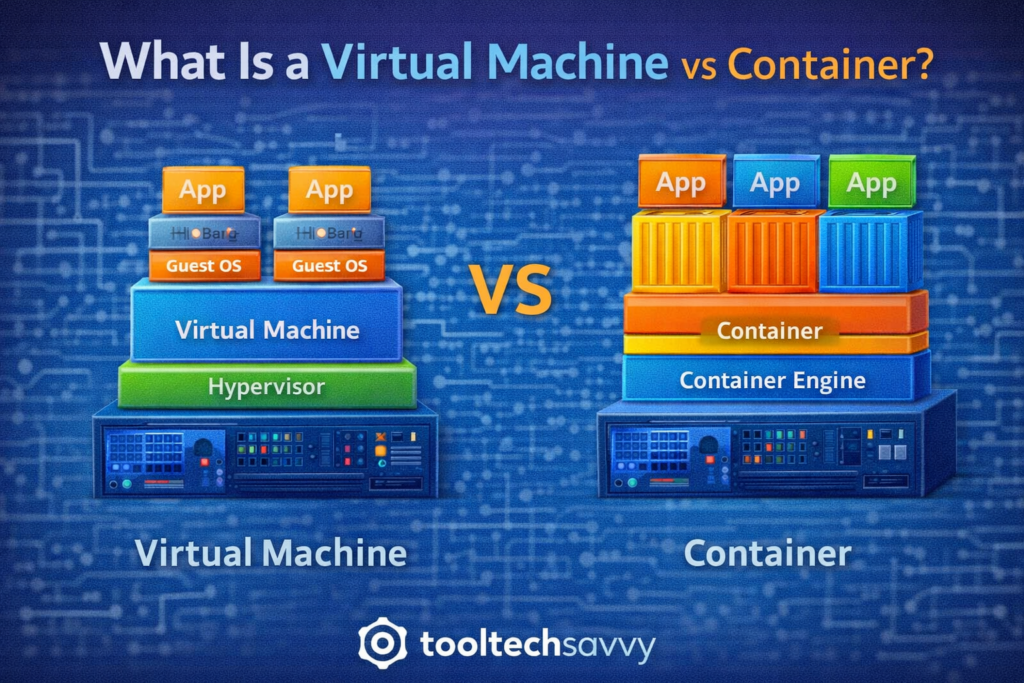
A virtual machine (VM) is a software-based computer that runs inside a physical computer.
Each virtual machine includes:
- Its own operating system
- Virtual CPU, memory, and storage
- Applications and dependencies
In simple terms, a VM behaves like a complete computer inside another computer.
How Virtual Machines Work
A physical machine runs a special layer called a hypervisor.
The hypervisor:
- Splits hardware resources
- Creates isolated virtual machines
- Allows multiple operating systems to run at once
Each VM is fully independent from the others.
What Is a Container?
A container is a lightweight way to package and run applications.
Instead of including an entire operating system, containers:
- Share the host system’s operating system
- Include only the application and its dependencies
- Start quickly and use fewer resources
Containers focus on running applications, not entire machines.
How Containers Work
Containers run on top of a container engine.
They:
- Isolate applications at the process level
- Share the same OS kernel
- Start almost instantly
- Scale easily
This makes containers ideal for modern, fast-moving development environments.
Virtual Machines vs Containers: The Key Difference
The main difference comes down to what is being virtualized.
| Feature | Virtual Machines | Containers |
|---|---|---|
| Includes OS | Yes | No |
| Startup time | Slower | Very fast |
| Resource usage | Higher | Lower |
| Isolation level | Strong | Lightweight |
| Best for | Full system isolation | App-level isolation |
When to Use Virtual Machines
Virtual machines are useful when:
- You need strong isolation
- You want to run different operating systems
- You’re migrating legacy applications
- Security boundaries are critical
They are still widely used in enterprise environments.
When to Use Containers
Containers are ideal when:
- You want fast deployments
- You’re building cloud-native apps
- You need easy scaling
- You’re using CI/CD pipelines
Most modern microservices and DevOps workflows rely heavily on containers.
How This Fits Into Cloud and DevOps
In real-world systems:
- Virtual machines often host container platforms
- Containers run applications inside those VMs
- CI/CD pipelines build and deploy containers
- Cloud platforms manage everything underneath
Both technologies often work together, not in competition.
Do Beginners Need to Learn Both?
Yes—but in the right order.
A beginner-friendly approach:
- Understand what a virtual machine is
- Learn why containers were introduced
- Focus on how containers improve speed and consistency
You don’t need to master either immediately—conceptual clarity comes first.
Common Beginner Misconceptions
- Containers are not mini virtual machines
- Virtual machines are not obsolete
- Containers do not replace the operating system
- Both have valid use cases
Understanding these distinctions avoids confusion later.
Final Thoughts
Virtual machines and containers solve the same core problem—running software reliably—but in different ways. Virtual machines provide full isolation, while containers deliver speed and efficiency.
Once beginners understand this difference, concepts like cloud architecture, DevOps pipelines, and scalable systems become much easier to grasp.
To continue learning—from infrastructure fundamentals to advanced topics like AI—visit https://tooltechsavvy.com/.
Explore the blog to discover AI, software engineering, cloud, DevOps, tools, and other interesting topics designed to help you grow confidently in tech.