Every time you compare flight prices, check a competitor’s product catalog, or see a “last updated 3 minutes ago” price tracker, there’s a good chance a web scraper did the legwork. But the scrapers of five years ago — brittle scripts that broke the moment a website redesigned its layout — are giving way to something more resilient. AI web scrapers can read a page more like a human does: understanding context, adapting to layout changes, and pulling out exactly the data you asked for in plain English.
This post covers what an AI web scraper actually is, how it differs from a traditional one, and a practical walkthrough for building your own.
- Core advantage
- Extracts by meaning instead of brittle selectors
- Best for
- Changing layouts, mixed sites, and messy content
- Main trade-off
- Higher latency and token cost per page
- Typical stack
- Playwright + cleaner + LLM + schema validator
- Recommended pattern
- Hybrid rules first, AI fallback when needed
What is a web scraper?
A web scraper is a program that visits web pages and extracts specific pieces of information — prices, headlines, contact details, reviews — and saves them somewhere structured, like a spreadsheet or database. At its core, a traditional scraper does three things: fetch the page’s HTML, locate the data using rules (like CSS selectors or XPath), and write the result out in a usable format.
The catch is that step two — locating the data — is fragile. If a site renames a CSS class or moves a price from one <div> to another, the scraper’s rules stop matching and it either fails outright or silently returns garbage. Anyone who has maintained a scraper for more than a few months knows the drill: the site changes, the scraper breaks, you rewrite the selectors, repeat.
So what makes a scraper “AI”?
An AI web scraper swaps out the brittle, rule-based extraction step for a language model that reads the page’s content and figures out what you’re asking for — much like you would if you opened the page yourself and skimmed it for the relevant details.
Semantic extraction
Instead of “grab the text inside span.price-value,” you describe intent: “get the current price, the currency, and whether it’s on sale.” The model figures out where that lives on the page, even if the markup shifts.
Layout resilience
Because the model reasons about meaning rather than fixed selectors, a redesigned page rarely breaks extraction the way it would with a hardcoded rule set.
Unstructured-to-structured
AI scrapers are far better at pulling structured data (JSON, tables) out of messy prose — reviews, forum posts, PDFs rendered as web pages — where rule-based scrapers struggle.
Built-in judgment
You can ask the model to normalize data as it extracts it — converting dates to ISO format, deduplicating entries, or flagging when a field looks missing or suspicious.
None of this makes AI scrapers strictly better in every case. They’re slower and more expensive per page than a well-maintained rule-based scraper, and they can occasionally “hallucinate” a value if the page is ambiguous. The sweet spot is sites that change often, have inconsistent structure, or where you’d otherwise spend more time maintaining selectors than the data is worth.
Rule of thumb: if you’re scraping one well-behaved, stable site at high volume, a traditional scraper is usually cheaper and faster. If you’re scraping many different sites, or ones that change layout often, an AI-assisted approach pays for itself in reduced maintenance.
The building blocks of an AI web scraper
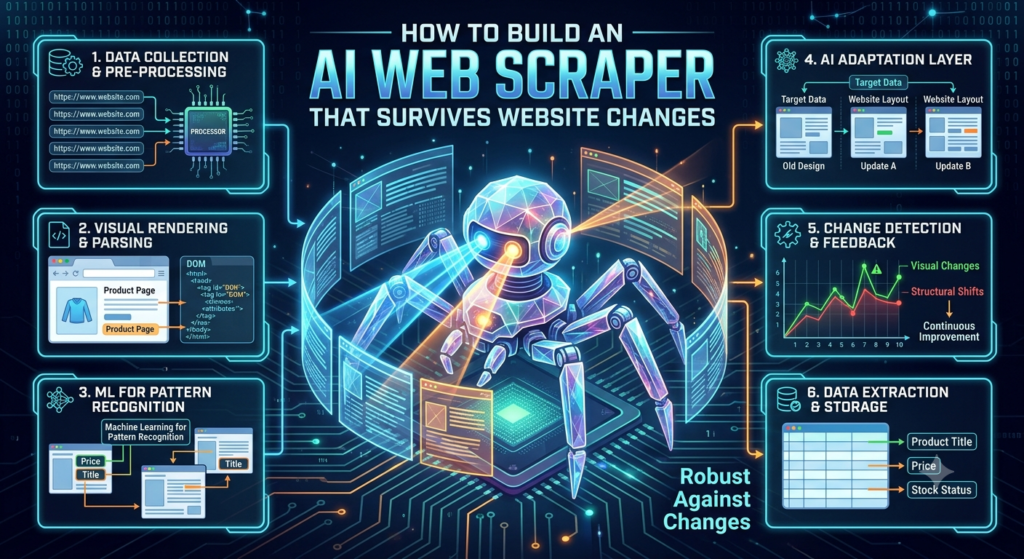
Regardless of which tools you pick, every AI scraper is assembled from the same five pieces.
| Component | Job | Common choices |
|---|---|---|
| Fetcher | Downloads the raw page, including content rendered by JavaScript | Playwright, Puppeteer, requests + a headless browser |
| Cleaner | Strips the HTML down to readable content before it hits the model, cutting token cost | Readability.js, trafilatura, BeautifulSoup |
| Extraction model | Reads the cleaned content and returns the fields you asked for | Claude, GPT-4-class models, or a smaller fine-tuned model for cost control |
| Schema / validator | Forces the model’s output into a strict, predictable shape | JSON Schema, Pydantic, Zod |
| Storage & scheduler | Saves results and re-runs the job on a cadence | Postgres/SQLite, cron, a queue like Celery or a workflow tool |
Building one: a practical walkthrough
1. Define your schema before you write a line of scraping code
The single biggest lever for reliability is telling the model exactly what shape you want back, rather than asking it to “extract the product info” and hoping. Define a schema up front.
{
  "product_name": "string",
  "price": "number",
  "currency": "string",
  "in_stock": "boolean",
  "rating": "number | null"
}
Most AI providers support structured output or tool-calling modes that force the response to match this shape, which eliminates a whole category of parsing bugs.
2. Fetch the page properly
A large share of scraper failures happen before the AI is even involved — the fetcher never got the real content. Many modern sites render their content with JavaScript, so a plain HTTP request returns an almost-empty shell. Use a headless browser (Playwright is the current favorite) so the page executes its scripts before you capture the HTML.
from playwright.sync_api import sync_playwright

def fetch_rendered_html(url):
    with sync_playwright() as p:
        browser = p.chromium.launch()
        page = browser.new_page()
        page.goto(url, wait_until="networkidle")
        html = page.content()
        browser.close()
        return html
3. Clean the HTML before it reaches the model
Raw HTML is full of navigation menus, scripts, and ad markup that waste tokens and confuse extraction. Run it through a readability-style extractor first to keep just the main content.
import trafilatura

def clean_content(html):
    return trafilatura.extract(html, include_tables=True)
4. Extract with the model, constrained to your schema
Pass the cleaned content and your schema to the model, and ask it to return only structured JSON matching that schema.
import anthropic, json

client = anthropic.Anthropic()

def extract(content, schema):
    response = client.messages.create(
        model="claude-sonnet-4-6",
        max_tokens=1024,
        messages=[{
            "role": "user",
            "content": f"Extract data matching this schema:\n{json.dumps(schema)}\n\nFrom this content:\n{content}\n\nReturn only valid JSON."
        }]
    )
    return json.loads(response.content[0].text)
5. Validate, don’t trust blindly
Run the model’s output through your schema validator (Pydantic or Zod both work well) and add sanity checks — a price of 0 or a null required field is a signal to retry or flag for review rather than silently save.
6. Schedule and monitor
Wrap the pipeline in a scheduler and log every run: pages fetched, extraction success rate, and validation failures. Failure-rate spikes are usually your first sign a site has changed something structural, even with an AI scraper in the loop.
Costs and trade-offs to plan for
- Token cost scales with page size. Cleaning the HTML aggressively before it reaches the model is the highest-leverage cost optimization you can make.
- Latency. An AI extraction call is slower than a regex match. For high-volume scraping, consider a hybrid: cheap rule-based extraction as the default, with AI extraction as a fallback when the rules fail.
- Rate limits and blocking. AI doesn’t change the fact that sites can detect and block scraping traffic. Respect
robots.txt, throttle your requests, and use a real user agent. - Legal and ethical boundaries. Scraping publicly visible data is common practice, but terms of service, copyright, and personal-data regulations (like GDPR) still apply. Check a site’s terms before scraping it at scale, and never scrape personal data without a lawful basis for doing so.
When to reach for a managed tool instead
If building and maintaining this pipeline isn’t the point — you just need the data — managed AI scraping platforms (Firecrawl, ScrapingBee’s AI extraction, Browse AI, and others) handle fetching, rendering, and extraction behind a simple API call. They’re worth it when speed to data matters more than owning the pipeline; building your own pays off when you need tight cost control, custom logic, or data flows that a generic tool doesn’t support.
The Practical Verdict
- Layouts change frequently
- You scrape many unrelated sites
- The source content is inconsistent or prose-heavy
- Maintenance time costs more than model calls
- The site is stable and predictable
- You need very high throughput
- Latency and per-page cost must stay minimal
- Selectors are easy to maintain
Want more deep dives like this?
I write regularly about AI tooling, developer workflows, and practical builds like this one on ToolTechSavvy.
Read more at tooltechsavvy.com